Help & advice
Best Floor Plan Creation Software for UK Renovations in 2026
Last updated: June 25, 2026
Planning a renovation properly is not just about drawing the shape of a room.
You need to work out what fits, where things go, what needs power or plumbing, what affects the quote, and how to explain all of that clearly to the people involved.
That is where the choice of floor plan software matters.
Some tools are built for drawing. Some are built for 3D modelling. Some are great for quick room layouts. Others are better for technical design work.
And some, like Reno, are built specifically for planning a renovation.
So before choosing a tool, it is worth asking: are you trying to draw a floor plan, visualise a room, create technical drawings, or actually plan the renovation?
What to look for in floor plan software for a renovation
For a UK home renovation, a floor plan tool needs to do more than look nice.
You will probably need to:
- Measure rooms accurately
- Try different layouts
- Add furniture, fixtures and fittings
- Plan sockets, switches and lighting
- Think about plumbing constraints
- Share your plans with trades, designers or suppliers
- Use the plan to get quotes
- Avoid missing decisions that become expensive later(!)
If you are just moodboarding a room, you might not need much more than a basic layout tool.
If you are planning a real renovation, you need something more practical.
The best tool depends on what you are actually trying to do.
Quick comparison
Tool | Best for | Strength | Limitations |
|---|---|---|---|
Reno | End to end renovation planning | Plans, elevations, briefs, quotes and decisions in one place | Not for 3D modelling |
Floorplanner | Quick basic layouts | Easy online floor plan creation | Not renovation specific (tips, advice, UK guidance) |
Planner 5D | Visualising room ideas | Large furniture library and 3D views | Not for renovation planning |
SketchUp | 3D modelling | Very flexible and powerful | Steep learning curve if you just want to plan a renovation |
Rayon | Technical layouts and drawings | Clean technical drawing workflow | Drawing-led not planning-led (everything separate) |
Canva Whiteboards | Early brainstorming | Quick collaborative layouts and moodboarding | Not a dedicated floor plan or renovation tool |
Reno
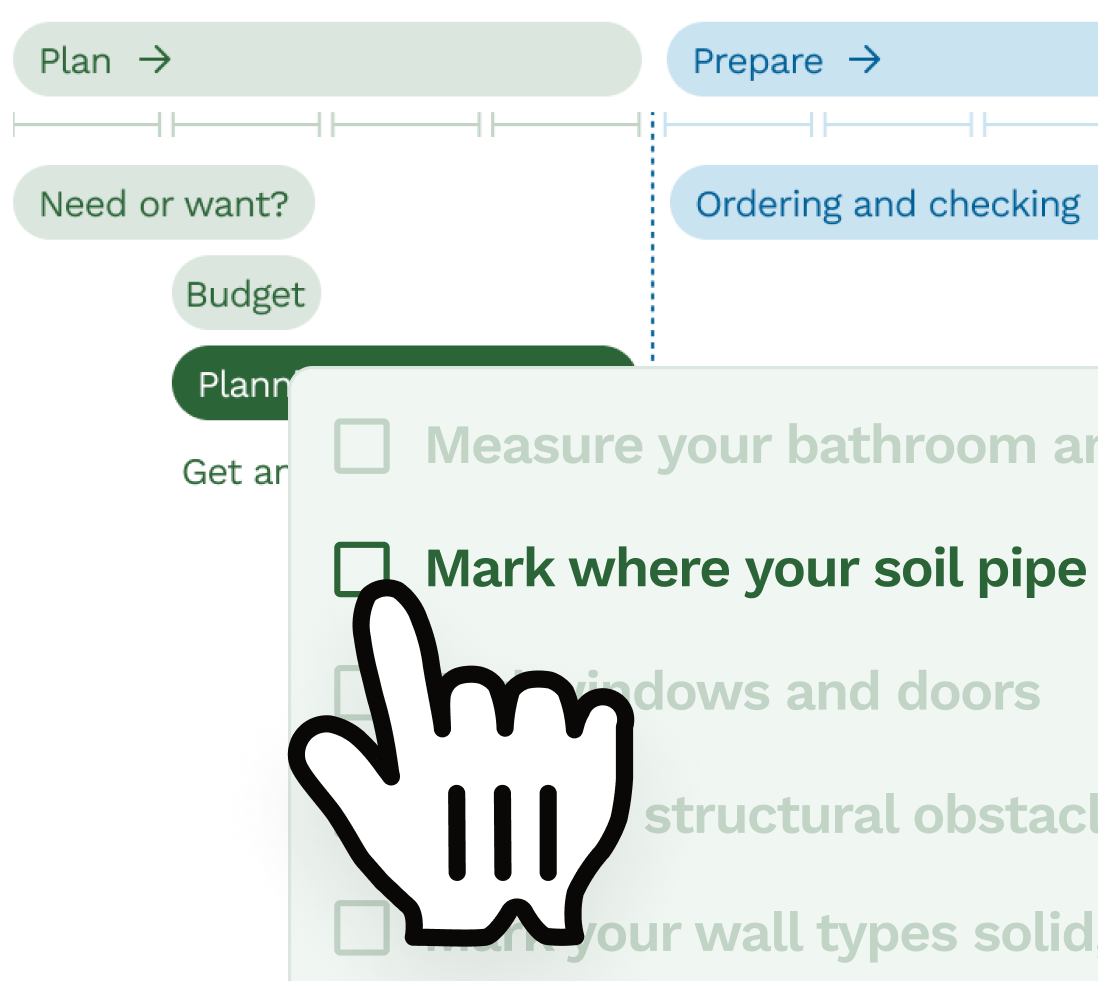
Reno is built for planning a renovation, not just drawing a room.
That matters because renovation planning is full of connected decisions.
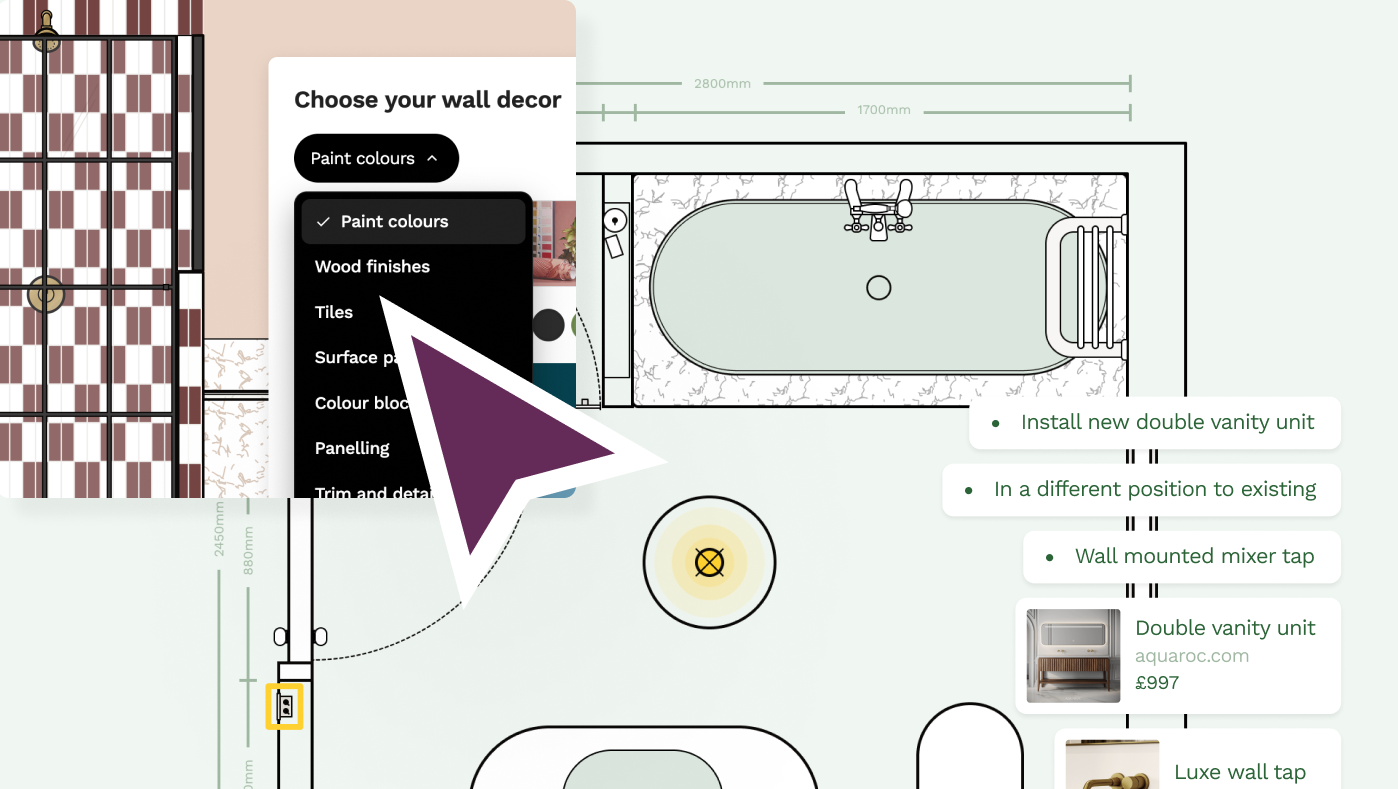
Move a toilet and it affects the soil pipe. Change the shower type and it affects the wall build-up. Add a wall light and it affects the electrical plan. Pick a wall-hung vanity and suddenly pipework, fixings and heights all matter.
Reno is designed around that reality.
It helps you:
- Create accurate room plans
- Plan layouts room by room
- Work with floor plans and wall elevations together
- Add furniture, fixtures, fittings and finishes
- Plan sockets, switches, lights and radiators
- Create briefs, quotes and shopping lists from the plan
- Share clearer plans with trades, designers and partners
The aim is not just to make a nice drawing.
It is to help you make better decisions before work starts.

Reno is a strong fit if you are:
- A homeowner planning a renovation
- An interior designer working through layouts including electrical, decor, furniture and paint plans with clients
- A trade or contractor creating detailed, easy to understand quotes and communicating plans with customers
- Someone who does not want to spend weeks learning CAD or 3D modelling software
It is less suited if your main goal is photorealistic 3D renders or formal architectural drawings. Reno offers 2D planning only in order to keep things really simple and easy to use across all different devices and web browsers, and give you exact control down to the smallest details like socket positions, skirting board heights, tiles and panels on your walls.
Floorplanner
Floorplanner is a simple online tool for creating floor plans quickly.
It can be useful if you want to sketch out a room, try a few furniture layouts or create a 3D render without too much complexity.
It is a good fit if you want:
- A quick basic layout
- 3D renders
- A lower learning curve than SketchUp
- Something more visual than pen and paper
It is less useful if you need a more detailed renovation plan, especially where you are thinking about elevations with distances between fixtures, sockets, switches and furniture, as well as having a plan you can share for quotes and build decisions. You're also missing control over trim, splashbacks, tile sizes, tile layouts and a way to communicate more sophisticated decor plans.
Planner 5D
Planner 5D is more focused on visualising room ideas.
It has a large furniture library and lets you create 2D and 3D room designs in different styles. It can be a good option if you enjoy experimenting with how a room might look - try scandi chic on for size.
It is useful for:
- Trying furniture layouts
- Visualising style ideas
- Playing with interiors
- Creating more visual room concepts
Where it may be less strong is in the practical renovation layer. A room can look good in 3D and still miss the details that matter on site, like where the sockets go, whether the door clashes with furniture, or how the plan turns into a quote or brief.
SketchUp
SketchUp is a powerful 3D modelling tool.
You can design almost anything in it, which is exactly why it can be too much for a straightforward renovation plan.
SketchUp is a good choice if you:
- Want to build a 3D model
- Are comfortable learning modelling software
- Need flexibility for unusual designs
- Already know your way around design tools
The issue is the learning curve.
For many renovators, the problem is not "how do I create a 3D model?" It is "how do I plan the room properly and explain it clearly to my builder?" If that is where you are, Reno is likely to be much easier to get started with.
Rayon
Rayon is a modern drawing tool for creating technical layouts and design drawings.
It is useful for people who are comfortable working with more design-led software and want clean, technical outputs.
Rayon is a good fit if you:
- Need technical layouts
- Are used to digital design tools
- Want more control over drawing detail
- Are producing presentation-style plans
Reno and Rayon solve slightly different problems. Rayon helps you create drawings. Reno helps you plan a renovation. In Reno, floor plans and wall elevations are part of the same planning workflow, which helps keep decisions connected rather than recreated separately across different views.
Canva Whiteboards
Canva Whiteboards can be useful for the very early stage of planning.
If you are just trying to map out rough ideas, collect inspiration or explain a basic layout to someone else, it can do the job.
It is useful for:
- Moodboarding
- Early layout thinking
- Collaboration
- Quick visual notes
But it is not a dedicated floor plan tool, and it is not built for accurate renovation planning. It is better for brainstorming than deciding exactly where everything needs to go.
Which floor plan tool should you choose?
It depends what you need the tool to do.
Choose Reno if:
- You are planning a real renovation
- You want something easy to use
- You need floor plans and elevations to work together
- You want to plan fixtures, fittings, sockets and decisions
- You want to share clear plans with trades
- You want a plan that helps with quotes, briefs and shopping lists
Choose Floorplanner if:
- You want a quick, simple floor plan
- You are testing basic layouts
- You do not need much project detail
Choose Planner 5D if:
- You want to visualise room ideas
- You like 3D views and furniture libraries
- You are more focused on style than build planning
Choose SketchUp if:
- You want full 3D modelling
- You are happy with a steeper learning curve
- You need a flexible modelling tool
Choose Rayon if:
- You want technical drawings
- You are comfortable with digital design tools
- You need drawing control more than renovation guidance
Choose Canva Whiteboards if:
- You are brainstorming ideas
- You want a simple collaborative canvas
- You are not yet ready to create a proper plan
The important difference
A floor plan is useful.
But a renovation plan needs to go further.
It needs to help you work out what fits, what changes, what needs to be decided, what needs to be shared and what could go wrong if it is missed.
That is the difference between drawing a space and planning a renovation. Reno is built for the second one.
FAQs
What is the best floor plan software for a UK renovation?
The best floor plan software depends on what you are trying to do. Reno is a strong choice if you are planning a real renovation because it connects floor plans, elevations, fixtures, fittings, briefs and quotes in one workflow.
What is the easiest floor plan software for homeowners?
The easiest tools are usually those designed for non-technical users rather than architects or CAD professionals. Reno and Floorplanner are more approachable than tools like SketchUp, AutoCAD or Revit.
Is 2D or 3D better for renovation planning?
2D plans are usually more useful for accurate renovation planning because they show dimensions, layout and clearances clearly. 3D can help with visualisation, but it is not always the best way to plan sockets, plumbing, furniture positions or trade decisions.
Do I need floor plan software for a renovation?
You do not have to use floor plan software, but it can make renovation planning much easier. A clear plan helps you test layouts, share decisions with trades and avoid expensive misunderstandings before work starts.
Can I use SketchUp for a home renovation?
Yes, SketchUp can be used for home renovation planning, especially if you are comfortable with 3D modelling. For many homeowners, though, it can be more complicated than needed if the main goal is to plan layouts and communicate decisions clearly.
What is the difference between floor plan software and renovation planning software?
Floor plan software helps you draw or visualise a space. Renovation planning software goes further by helping you make connected decisions about layouts, fixtures, fittings, elevations to quotes and what needs to happen on site.
What floor plan software can I share with my builder?
Most floor plan tools let you share drawings or images, but for builders the most useful plans are clear, accurate and easy to understand. Reno is designed to help homeowners and trades work from the same renovation plan, not just a screenshot.
Can floor plan software replace an architect?
No. Floor plan software can help you plan and communicate your renovation, but it does not replace an architect, structural engineer or building control where professional input is needed. For structural changes, always get the right professional advice.
Related articles
Product comparison
Reno versus Rayon: Which is right for your renovation?
Planning a renovation and looking at tools like Rayon? Read this first to compare the differences between Reno and Rayon.
Product comparison
Is Reno an alternative to using SketchUp for your home design
Lots of Reno users tried out SketchUp for their renovation project before coming to Reno - so we've compared the two to help you understand the difference.
Product comparison
Best trade quoting software for renovation jobs in 2026
A practical comparison of quoting options for renovation jobs, from Reno and trade admin tools to accounting software, spreadsheets and WhatsApp.
Product comparison
Best home renovation planning tools in 2026
A practical comparison of renovation planning tools, from Reno and SketchUp to Pinterest, Canva, spreadsheets and WhatsApp.
Product comparison
Why we're building a renovation planning app in the UK
Why Reno is being built around the awkward details of UK renovations, clearer homeowner briefs and accurate 2D planning.
All rooms
Why an accurate floor plan matters so much in a renovation
Why accurate plans matter for quotes, layouts, wall details, first fix decisions and quantities before work starts.
Free tools to get started

Join our mailing list and get 10% off
Who are you? *
By signing up, you are agreeing to our Terms and Privacy Policy including receiving emails from us at Reno (you can unsubscribe at any time). Opted out but want back in? Re-subscribe to the mailing list .
Start your renovation with Reno